What is JPEG XL (JXL)? The complete guide
JPEG XL (JXL) delivers images 30 to 50% smaller than JPEG at the same visual quality, and as of October 2026, Chrome and Firefox finally support it. Both browsers switched it on by default this month, joining Safari, which has supported it since 2023.
At TinyPNG, we optimize roughly 3 million images every day, and JPEG XL is now one of the formats our online image compressor and converter handles. This guide covers what JPEG XL is, how it compares to JPEG, its current browser support, why you should use it, and how to compress and convert your images to JXL with TinyPNG.
TL;DR
JPEG XL files are 30 to 50% smaller than JPEG at the same visual quality, according to the Chrome team.
Browser support arrived in October 2026. Chrome 155 and Firefox 158 now decode JPEG XL by default, and Safari has supported it since iOS 17 and macOS14.
One format covers a lot of ground. JPEG XL handles transparency, animation, HDR, lossless compression, and progressive loading.
Keep a fallback for now. Older browser versions still can’t open JXL, so serve it alongside JPEG, WebP, or AVIF.
TinyPNG compresses and converts to JXL in one step. Upload an image and get an optimized JXL back in seconds.
What is JPEG XL?
JPEG XL is a royalty-free image format developed by the JPEG committee, the same group behind the original JPEG. It was standardized in 2021 and 2022 as ISO/IEC 18181, and it’s designed to replace JPEG, PNG, and GIF with one format that compresses better and does more.
JXL files use the .jxl extension. The format supports both lossy compression and lossless compression.
JPEG XL vs. JXL explained: They’re the same thing. JPEG XL is the format’s full name, and JXL is its short name and file extension.
What JPEG XL can do
Transparency and animation: see-through background and multi-frame animations, like PNG and GIF
HDR and wide color: more vivid colors and contrast on modern screens
Progressive loading: image appears right away at low detail and sharpens as the rest of the file arrives
Lossless JPEG transcoding: turns an existing JPEG into a smaller JXL without losing any data, and the original JPEG can be rebuilt from it
Very large images: handles ultra-high-resolution files with over a billion pixels
Fast decoding: loads quickly on everyday devices, with no special hardware needed
"JPEG XL can do everything that JPEG, PNG, GIF, TIFF, BMP, WebP, AVIF, and HEIC can do, and more." (Sneyers et al., The JPEG XL Image Coding System, arXiv)
The wider industry is taking notice too. In late 2025, the PDF Association picked JPEG XL as its preferred format for HDR images in PDF files. A move widely credited with helping bring JXL back to Chrome.
JPEG vs JPEG XL: What’s the difference?
JPEG has served the web for over 30 years. JPEG XL keeps what works about it and fixes what doesn’t: smaller files, more features, and better detail at the same file size.
| Feature | JPEG (JPG) | JPEG XL (JXL) |
|---|---|---|
| File size at the same quality | Baseline | 30 to 50% smaller than JPEG |
| Transparency | No | Yes |
| Animation | No | Yes |
| HDR and wide color | No | Yes |
| Lossless compression | Rarely supported | Yes |
| Progressive loading | Basic (progressive JPEG) | Yes, with finer detail steps |
| Browser support | All browsers | Latest Chrome, Edge, Firefox, and Safari |
| Best for | Sharing anywhere, maximum compatibility | Photos and high-quality images on your website |
The biggest difference is how JPEG XL compresses. Its encoder is tuned to how human vision works, so it keeps the details your eye notices and drops the ones it won’t. That’s why a JXL file can look sharper than a JPEG at the same size.
Which format should you pick?
| Format | Best for |
|---|---|
| JPEG | Places that need the widest compatibility, like email and social media |
| PNG | Screenshots, graphics with text, and images you need to share |
| WebP | Everyday website images, with support in every modern browser |
| AVIF | Very small files for photos on your website |
| JPEG XL | High-quality photos, HDR images, and lossless images on your website |
The Chrome team recommends trying both AVIF and JPEG XL to see which gives you the best result. JPEG XL tends to shine for high-fidelity and lossless images, especially photos. All of these formats work best when compressed with TinyPNG's image optimizer.
How to compress and convert images to JPEG XL with TinyPNG
TinyPNG's converter compresses as it converts, so you don’t need a separate compression step. It analyzes each image individually and finds the right settings, so you get a properly optimized JXL, not just a renamed file.
Go to TinyPNG’s JXL Converter
Drag and drop your JPEG, PNG, HEIC, WebP, or AVIF images into the upload area
Download your compressed JXL files
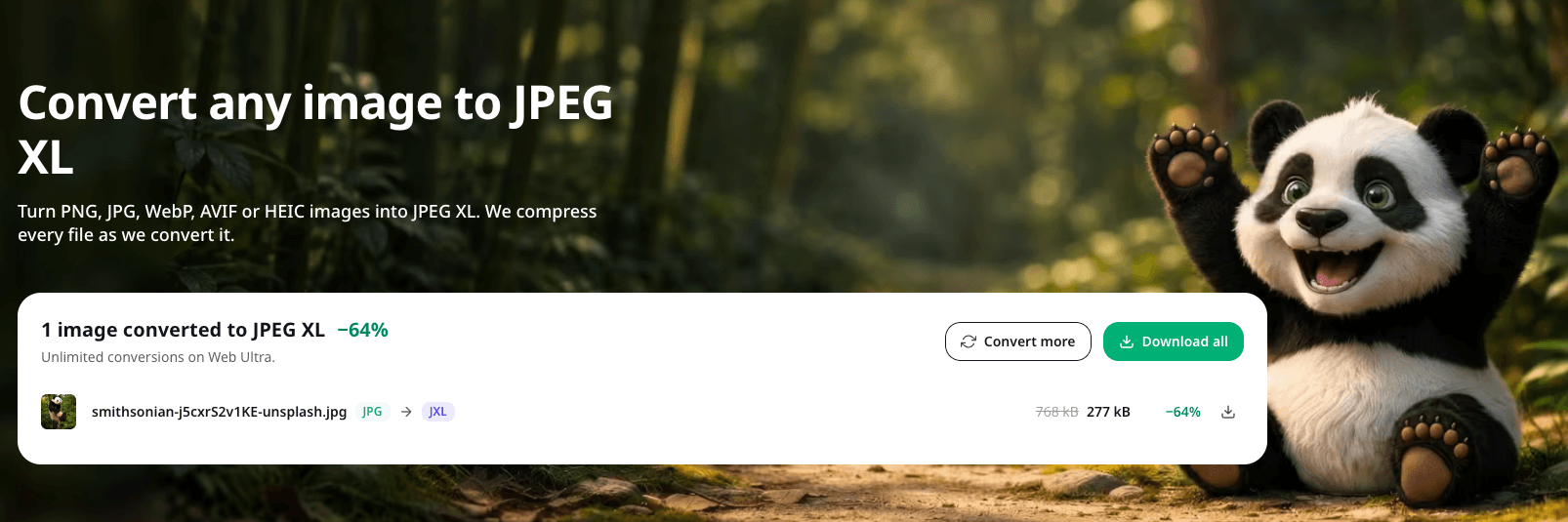
The compressed JXL is 64% smaller than the original JPEG.
The free web tool compresses up to 20 images and converts up to 3 images at a time. Our web subscriptions remove those limits and deliver faster compression.
Convert to JPEG XL
Drop in a JPEG, PNG, AVIF, or WebP file and see how much smaller it gets.
JPEG XL browser support: Can I use it today (October 2026 update)?
Yes. October 2026 is when JPEG XL went from “worth watching” to “ready to serve.” Chrome 155 shipped JPEG XL decoding on October 6; Firefox 158 turned it on by default on October 13. Safari has supported it since 2023.
| Browser or system | JPEG XL support |
|---|---|
| Chrome | Yes, from version 155 (desktop and Android) |
| Edge | Yes, from version 155 |
| Firefox | Yes, from version 158 |
| Safari (macOS and iOS) | Yes, from Safari 17 |
| macOS and iOS | Yes, from macOS 14 and iOS 17 |
| Windows 11 | Yes, with Microsoft’s free JPEG XL image extension (version 24H2 and later) |
A few gaps are still worth knowing about:
Older browser versions can’t open JXL. Visitors who haven’t updated will need a fallback.
Safari’s support is partial. It doesn’t yet handle every JPEG XL feature, like animation.
Email and social media don’t accept JXL yet. Stick with JPEG or PNG for images you share outside your website.
The practical approach is to serve JXL to browsers that support it, with a JPEG, WebP, or AVIF fallback for everyone else. The HTML <picture> element does this for you. The browser picks the first format it can display:
<picture>
	<source srcset="product.jxl" type="image/jxl">
	<source srcset="product.avif" type="image/avif">
	<img src="product.jpg" alt="Product photo" width="800" height="600">
</picture>
Why JPEG XL matters for page speed and SEO
Smaller images, faster pages
Images are often the heaviest files on a web page. Cutting a photo’s file size by 30 to 50% means less to download, which matters most on mobile connections and image-heavy pages like product listings and galleries. Across a full image library, it also lowers your bandwidth costs.
Faster pages, better SEO
Google uses Core Web Vitals as part of how it ranks pages. One of these metrics, Largest Contentful Paint (LCP), measures how long the biggest visible element takes to load. That’s often a hero image or a product photo, and Google considers an LCP of 2.5 seconds or less to be good.
Pages that feel faster
JPEG XL’s progressive loading shows a low-detail version of an image almost immediately, then sharpens it as the rest of the file arrives. Visitors see something useful sooner, even on a slow connection.
Want to see how much your current images slow you down? The free Page Analyzer shows how much load time you could save by compressing them.
Check your page speed
See how much time you could save by optimizing your images.
Should I use JPEG XL today? (October 2026 update)
Yes, with a fallback.
Now that Chrome, Firefox, and Safari all support it, JPEG XL is a practical choice for your website, not just an experiment. Here’s how to approach it:
For photo-heavy sites (e-commerce, portfolios, galleries): Serve JXL to supporting browsers with an AVIF, WebP, or JPEG fallback. Product photos and hero images are where the quality-per-byte gains show most.
For most other sites (blogs, marketing pages): WebP and AVIF are still solid defaults. Add JXL as an extra option when you’re ready.
For lossless images and archives: JPEG XL is a strong pick. Lossless JPEG transcoding shrinks existing JPEGx without losing any data.
For HDR and wide-color images: JPEG XL is built for this, and it’s now the PDF Association’s preferred HDR format.
For animated images: WebP is still the safest choice while animated JXL support catches up.
For email, social media, and documents: Keep using JPEG or PNG. Most of these platforms don’t accept JXL yet.
Try JPEG XL compression
Upload an image and see how much smaller JXL makes it.
Start serving smaller, sharper images
JPEG XL covers what JPEG, PNG, and GIF can do, adds HDR and lossless JPEG transcoding, and does it at smaller file sizes. With Chrome, Firefox, and Safari on board, you can start using it on your website today. Convert your images to JXL with TinyPNG, keep a fallback for older browsers, and your pages load faster without losing quality.
Frequently asked questions
01. Is JPEG XL better than AVIF?
It depends on the image. The Chrome team suggests trying both, and notes that JPEG XL works especially well for high-fidelity and lossless photos. AVIF can produce very small files at lower quality settings. With Web Ultra, you can convert the same image to both and keep the smaller one.
02. Is JPEG XL better than PNG?
For images on your website, usually yes. JPEG XL supports transparency and lossless compression like PNG, typically at a smaller file size. PNG is still the safer choice for images you share by email, on social media, or in documents.
03. How do I open a JXL file?
On a Mac or iPhone, JXL files open natively in macOS 14 and iOS 17 or later. On Windows 11, install Microsoft’s free JPEG XL Image Extension from the Microsoft Store. You can also drag a JXL file into the latest version of Chrome, Firefox, or Safari.
04. Can I convert a JXL file back to JPG or PNG?
Yes. TinyPNG's image converter accepts JXL files and converts them to JPEG, PNG, AVIF, or WebP files, compressing them along the way. The free tool converts up to 3 images at a time (Web Ultra gives you unlimited conversions).
05. Does converting to JPEG XL reduce image quality?
TinyPNG uses smart lossy compression techniques, which remove data your eyes can’t detect, so the difference isn’t visible. If you need every pixel kept exactly, JPEG XL also supports fully lossless compression.